This blog explains how website owners should manage search engine and AI crawler access through robots.txt. It highlights the differences between AI crawlers, common crawling errors, and why AI audit warnings need technical verification. It also introduces a three-layer framework covering Search Access, AI Discovery and Content Governance, helping SEO professionals make better decisions about website accessibility and content control.
A website can be technically accessible to Google but unavailable to an AI-powered audit tool. A crawler might access a page today and fail to retrieve it a few days later. An SEO audit might even report that robots.txt is blocking a crawler when the actual file contains no such restriction.
These situations raise a question that deserves more attention:
Do we really know who can access our websites, why they are accessing them and what happens when they cannot?
For years, robots.txt was mainly discussed in the context of search engine crawling. Website owners used it to guide Googlebot and other search engine crawlers.
AI search has added another dimension. Different automated systems now visit websites for search discovery, content retrieval, model development and user-requested tasks.
These activities do not all have the same purpose. They should not automatically receive the same access policy.
The conversation around robots.txt needs to move beyond simply allowing or blocking bots. Website owners need to understand the difference between search visibility, AI discovery and content access.
One website, different crawlers, different purposes
The term AI crawler is often used as if every AI-related bot performs the same task. That is not accurate.
Different companies use different crawlers and user agents for different activities.
For example, OpenAI documents separate user agents for search discovery, model development and certain user-initiated requests.
Collects web content that may contribute to Claude model development
Collects web content that may be used for model development
Retrieves pages for certain user-initiated requests
Helps surface websites in ChatGPT search
Supports user-initiated page access in Claude
The distinction matters.
A website owner may want their articles to appear in AI search results but may have a different preference about whether their content is used for model training.
Blocking every AI-related user agent could affect more than one activity. Allowing every crawler without reviewing its purpose may not match the website owner’s preferences either.
This is why crawler identification should come before crawler restrictions.
Official references: OpenAI crawler documentation and Anthropic’s crawler guidance.
Search visibility and content control are two different decisions
Traditional SEO focuses heavily on making useful pages accessible to search engines.
AI search adds another question: how should a website manage access for systems that retrieve or collect its content?
Consider a website that publishes original research, guides and industry articles.
The owner may want:
- Google to crawl and index the articles.
- AI search systems to retrieve relevant pages.
- Certain training crawlers to be restricted.
- Private or paid content to remain inaccessible without authorisation.
These preferences can coexist. They do not require a website owner to choose between allowing every bot and blocking every bot.
For example, OpenAI separates OAI-SearchBot from GPTBot. A website can allow one while disallowing the other, according to its preferences.
That distinction is important for publishers, businesses and independent website owners.
However, allowing a search crawler does not guarantee that a page will appear in an AI answer. Retrieval, selection, relevance and the final response are separate processes.
Crawler access is an opportunity for discovery, not a guarantee of visibility.
A robots.txt rule does not explain every crawling problem
This is where technical SEO audits need more care.
Robots.txt communicates crawling preferences to compliant crawlers. It does not guarantee that a crawler can successfully retrieve a page.
A request can fail for several reasons:
- A robots.txt rule disallows the requested path.
- A firewall or security service blocks the request.
- The server applies rate limits.
- The website returns a server error.
- The request times out.
- A DNS or TLS connection problem prevents retrieval.
- The auditing tool cannot access the page through its own retrieval system.
These problems can produce similar results from the user’s perspective: the page cannot be retrieved.
But their causes are different.
Google also makes an important distinction in its documentation: robots.txt controls crawling, not whether a page is kept out of search results. If a page must not appear in Google Search, a suitable indexing restriction or authentication may be needed instead.
This means website owners should avoid treating robots.txt as a security system or a universal solution for controlling content.
When an AI SEO audit reports the wrong robots.txt issue
I recently came across an interesting situation while conducting an SEO audit with Claude.
During the audit, Claude reported that the website’s robots.txt file was blocking the Claude bot.
I checked the robots.txt file manually.
The configuration was:
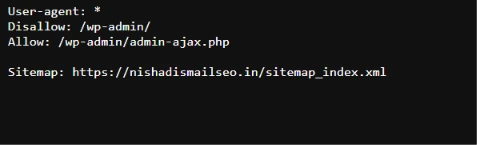
This is a standard WordPress-style configuration.
The User-agent: * directive applies to crawlers generally. However, the only disallowed path is /wp-admin/. The Allow directive makes an exception for /wp-admin/admin-ajax.php.
There is no rule here disallowing the entire website or its public pages. There is also no specific rule blocking ClaudeBot.
So why did the audit report a crawler restriction?
I observed something else: sometimes Claude could access and analyse the same website, while at other times the audit reported an access problem. After a few days, the audit could work again without any changes to the website.
I have seen similar behaviour while checking other websites.
This does not establish the exact cause. It does, however, show why an AI audit finding should be treated as a starting point for investigation rather than automatic proof of a technical problem.
There is another important distinction: asking Claude to analyse a website does not necessarily mean Anthropic’s automated training crawler, ClaudeBot, is making the request. Claude’s user-initiated retrieval and its automated crawling activities are separate.
A tool reporting that a crawler is blocked does not prove that robots.txt caused the failure.
The actual request, user agent, response status and server logs are needed before reaching that conclusion.
How to distinguish the possible causes
What you find | What it may indicate | What to check |
Matching Disallow rule | robots.txt restriction | User-agent group and requested URL path |
HTTP 403 | Access denied | Firewall, security rules or server permissions |
HTTP 429 | Too many requests | Rate limits and bot protection |
HTTP 5xx | Server-side failure | Hosting, server and upstream logs |
Timeout, DNS or TLS error | Connection or retrieval failure | DNS, SSL and network availability |
Successful HTTP response | Request returned successfully | Page content, redirects and response headers |
These are diagnostic clues, not automatic conclusions. For example, an HTTP 403 does not tell you which security rule caused the denial. You still need to inspect the relevant logs.
What I would check during an SEO audit
I would follow this order:
- Open the website’s robots.txt file directly.
- Identify the user agent mentioned in the audit.
- Check whether a matching rule actually blocks the requested path.
- Test the homepage and affected URLs separately.
- Review HTTP response codes and redirects.
- Check hosting, CDN and firewall logs for blocked requests or rate limits.
- Repeat the test and compare the results.
A three-layer framework for AI crawler management
I would approach AI crawler management through three separate layers.
This is a practical framework I propose for technical SEO audits, not an official standard.
1: Search access
The first layer focuses on traditional search engine crawling.
Check:
- Googlebot access to important pages.
- Robots.txt rules.
- XML sitemap availability.
- Canonical URLs.
- Indexing directives.
- Internal links and crawl paths.
- Server response codes.
The main question is:
Can search engines access the pages that should be discovered and indexed?
2: AI discovery
The second layer focuses on AI-powered search and user-requested retrieval.
Check:
- Which AI search crawlers are relevant to the website?
- Are the relevant user agents allowed?
- Can important public pages be retrieved?
- Are server-side security rules affecting automated requests?
- Are important pages returning usable content?
- Are crawler failures being recorded accurately?
The main question is:
Can relevant AI systems access the public information that the website owner wants them to discover?
3: Content governance
The third layer focuses on the website owner’s preferences about content access and use.
Check:
- Which content is public?
- Which content is paid or restricted?
- Are there separate preferences for search and training crawlers?
- Is sensitive information protected through authentication?
- Are crawler policies documented and reviewed?
- Are the website’s access preferences reflected in the relevant technical controls?
The main question is:
Who should be allowed to access the content, and for what purpose?
This framework helps prevent a common mistake: treating every AI crawler as a single technical category.
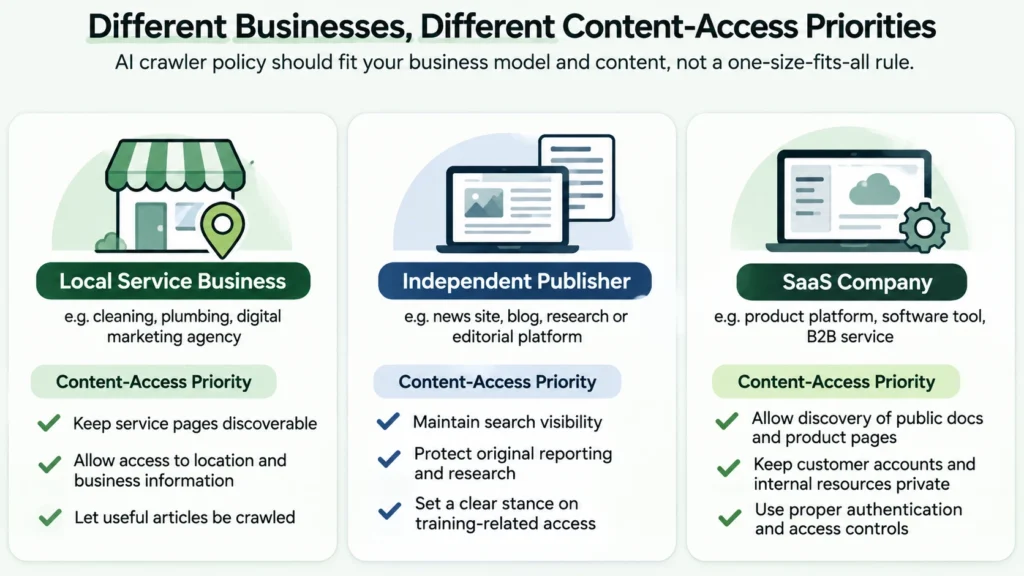
A local business website, a digital publisher and a SaaS company may have very different reasons for allowing or restricting automated access.
Should every website have the same AI crawler policy?
I don’t think so.
The right policy depends on the website’s business model and the type of content it publishes.
A local service business
A cleaning company, plumbing business or digital marketing agency usually wants its public service pages, location information and useful articles to be discoverable.
For these websites, allowing relevant search and retrieval crawlers may support discovery. Blocking useful crawlers without a clear reason could reduce access to public business information.
An independent publisher
A publisher may invest considerable time and money in original reporting, research and editorial content.
It may want search visibility while having separate preferences about training-related access. The business decision is not simply whether AI is good or bad. It is about how the publisher wants its work to be accessed and used.
A SaaS company
A SaaS website may have public documentation, product pages, customer resources and private account information.
Public documentation may benefit from discovery. Private dashboards, customer records and internal resources should be protected through proper authentication and access controls.
There is no single robots.txt configuration that makes sense for every business.
What an SEO audit should measure beyond robots.txt
Traditional technical SEO audits often check whether robots.txt exists, whether the sitemap is accessible and whether important URLs can be crawled.
Those checks remain useful. But they do not tell the whole story when automated AI access is involved.
I would add the following checks to a technical SEO audit:
- Crawler identification
Identify the relevant user agents and understand their stated purposes. Do not group every AI-related request under one label.
- HTTP response monitoring
Check whether important pages return successful responses or errors. Record the status codes rather than relying only on a tool’s summary.
- Server and CDN log analysis
Review requests to important URLs. Look for repeated failures, rate limits, security challenges and unexpected blocks.
- Robots.txt rule validation
Check the actual user-agent groups and paths. A general rule and a crawler-specific rule may produce different results.
- Content accessibility
A successful HTTP response does not automatically mean that a page is useful to an automated system. Check whether the relevant content is present in the returned HTML and can be accessed without unnecessary barriers.
- Repeat testing
If an audit reports a crawler issue, repeat the test. Compare the response and logs before making changes.
This last point deserves attention. Changing robots.txt to fix a problem that was actually caused by a temporary server failure can introduce a new problem without solving the original one.
A note about the limits of robots.txt
Robots.txt is a public set of instructions for compliant crawlers. It is not an access-control mechanism.
A disallowed URL may still be discovered through links. A crawler may also choose not to follow the instructions. For confidential content, use authentication and proper server-side access controls.
Similarly, adding an AI crawler to an Allow policy does not guarantee that the crawler will visit the site, retrieve every page or use the content in a particular way.
Website owners should also remember that crawler policies and AI platform documentation can change. Review official guidance before making major changes to a site’s access rules.
For the technical fundamentals, refer to Google’s robots.txt documentation.
What SEO professionals should prioritise now.
I don’t think AI crawler management should replace traditional technical SEO.
A website still needs accessible pages, clear internal linking, useful content, correct indexing directives, reliable hosting and a sound technical structure.
But technical SEO audits should become better at distinguishing between different types of access.
When an AI tool reports that a website is blocked, the next step should not automatically be to edit robots.txt.
First, verify the rule. Then check the request. Review the response. Inspect the logs. Only after identifying the cause should you make a technical change.
This approach also improves the quality of AI-assisted SEO audits. AI tools can help identify possible problems, but their findings still need technical verification.
Website access is becoming a business decision
Robots.txt started as a way to communicate crawling preferences to automated systems.
Today, website owners have to think about more than search engine access. They need to consider AI search discovery, user-initiated retrieval, model development and the protection of restricted content.
The important point is not to allow every crawler or block every crawler.
It is to understand the purpose of each request and make access decisions based on the website’s goals.
My experience with intermittent AI audit errors also reinforces a simple lesson: a crawler access warning is not a confirmed robots.txt issue until the evidence supports it.
Technical SEO professionals should move beyond checking whether a rule exists. They should verify how the website actually responds to requests.
Because in the age of AI search, knowing who can read your website is only the first step. Knowing why they can or cannot access it is just as important.
FAQ
Does robots.txt control all AI crawlers?
No. Robots.txt communicates access preferences to compliant crawlers. It is not a security mechanism, and not every automated system is required to follow it.
Does allowing ClaudeBot or GPTBot improve AI search visibility?
Not directly. Training-related crawlers and search-related crawlers have different purposes. Allowing a training crawler does not guarantee that a website will appear in AI search results.
Can an AI SEO audit incorrectly report a robots.txt issue?
Yes. A retrieval failure can be misdiagnosed as a robots.txt restriction. Check the actual rules, HTTP response, user agent and server logs before making changes.
Should I block AI crawlers from my website?
That depends on your business model, content ownership and access preferences. Review each crawler’s purpose before deciding.
Is robots.txt enough to protect private content?
No. Use authentication and server-side access controls for private information. Robots.txt is not designed to protect confidential content.