
When someone searches for a business near them, they usually want an answer quickly.
They may search for:
“dentist near me”
“restaurant in Thrissur”
“electrician near me”
“digital marketing agency in Kochi”
“AC repair in Dubai”
For a local business, these searches can lead to a phone call, WhatsApp message, website visit, booking, quotation request, or store visit.
This is where local SEO becomes important.
Local SEO helps businesses improve their visibility when people search for products, services, or businesses in a specific area. A major part of that work involves Google Business Profile, but local SEO is not limited to the profile.
Your website, business information, reviews, local pages, citations, links, and overall online presence can all contribute to how your business is discovered and evaluated.
Google says local results are mainly based on relevance, distance, and prominence. It also says there is no way to request or pay for a better local ranking.
So the real question is not:
“How do I put keywords into my Google profile?”
It is:
“How do I make my business clear, relevant, trustworthy, and easy to find for local customers?”
What Is Local SEO?
Local SEO is the process of improving your online presence so your business can appear for searches connected to a specific location.
Traditional SEO often focuses on searches such as:
- what is technical SEO
- how to improve website speed
- SEO tools
- content marketing strategy
Local SEO focuses more on searches such as:
- plumber in Thrissur
- salon near me
- wedding photographer in Kochi
- restaurant in Kunnamkulam
- physiotherapy clinic near me
The location may be written directly in the search, or Google may use the searcher’s location to show local results.
This is one reason local SEO can be useful for businesses that depend on customers from a particular city, district, neighbourhood, or service area.
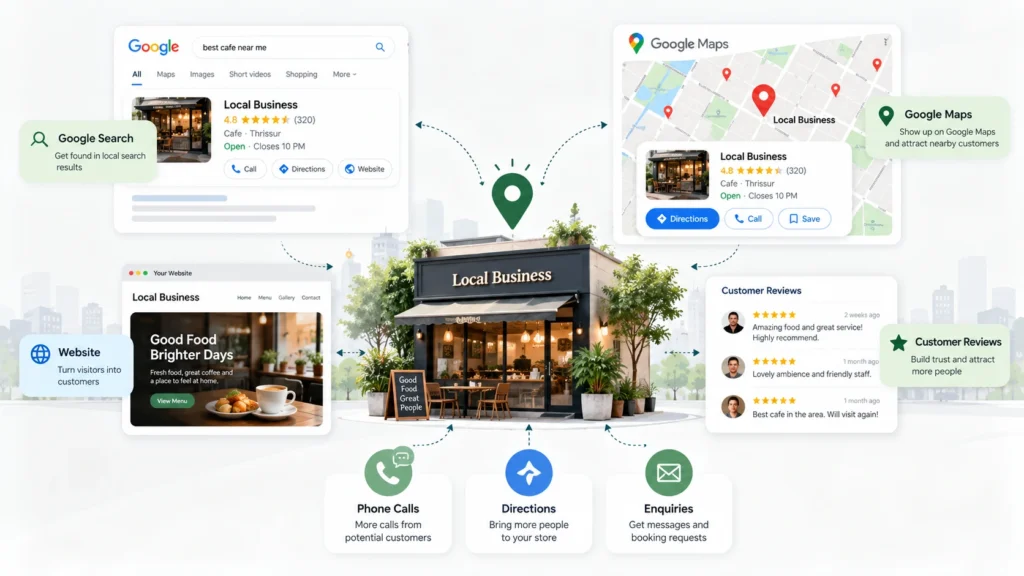
Your website still matters. Your Google Business Profile matters. Your reputation matters. Your business information needs to make sense across different places online.
For a wider explanation of how SEO connects search visibility with customers and enquiries, read Why Does My Business Need SEO?.
What Is Google Business Profile?
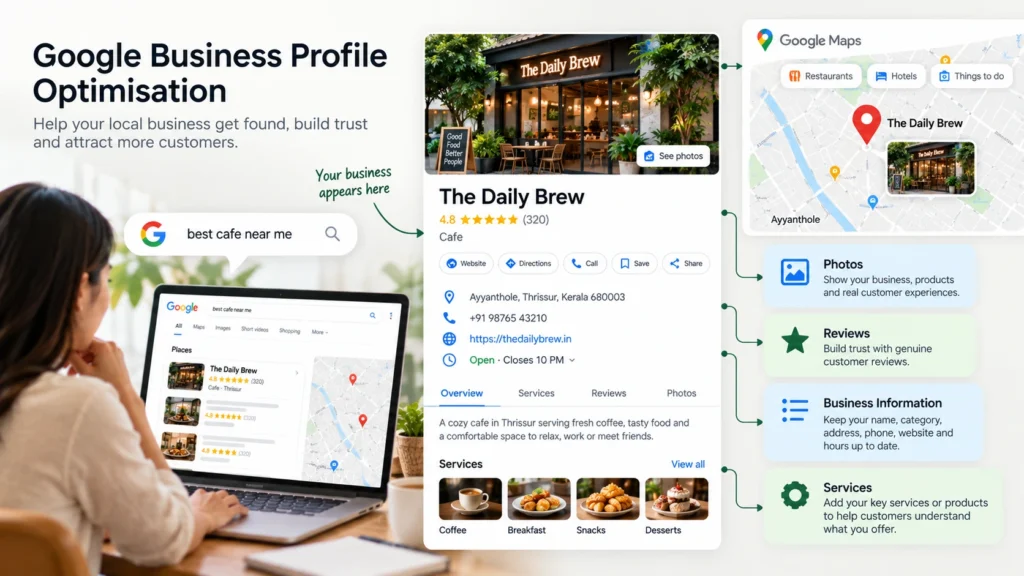
Google Business Profile, commonly called GBP, is the business listing that appears on Google Search and Google Maps.
A verified profile can show information such as:
- Business name
- Category
- Address
- Service area
- Phone number
- Website
- Opening hours
- Reviews
- Services
- Photos
- Business description
Google describes Business Profile as a way to manage how your business appears on Search and Maps and to help customers find and interact with your business.
For a local business, this can become one of the most important parts of the search journey.
A customer may find you on Maps before ever visiting your website.
That means your Google Business Profile is not just a directory listing.
It is part of your online storefront.
Is Google Business Profile the Same as Local SEO?
No.
This is a common misunderstanding.
Google Business Profile is one part of local SEO.
Local SEO can include:
- Google Business Profile optimisation
- Website optimisation
- Local keyword research
- Location pages
- Service pages
- Reviews
- Local citations
- Relevant local links
- Business information consistency
- LocalBusiness structured data
- Content targeting local search intent
- Conversion optimisation
- Search performance tracking
Think of it this way:
GBP = your business presence on Google Maps and Search
Local SEO = the wider system supporting your local visibility
A strong profile with a weak website may leave opportunities on the table.
A good website with poor local signals can have the same problem.
The two should support each other.
How Does Google Decide Which Local Businesses to Show?
Google says local results are mainly influenced by three factors: proximity, relevance and prominence.
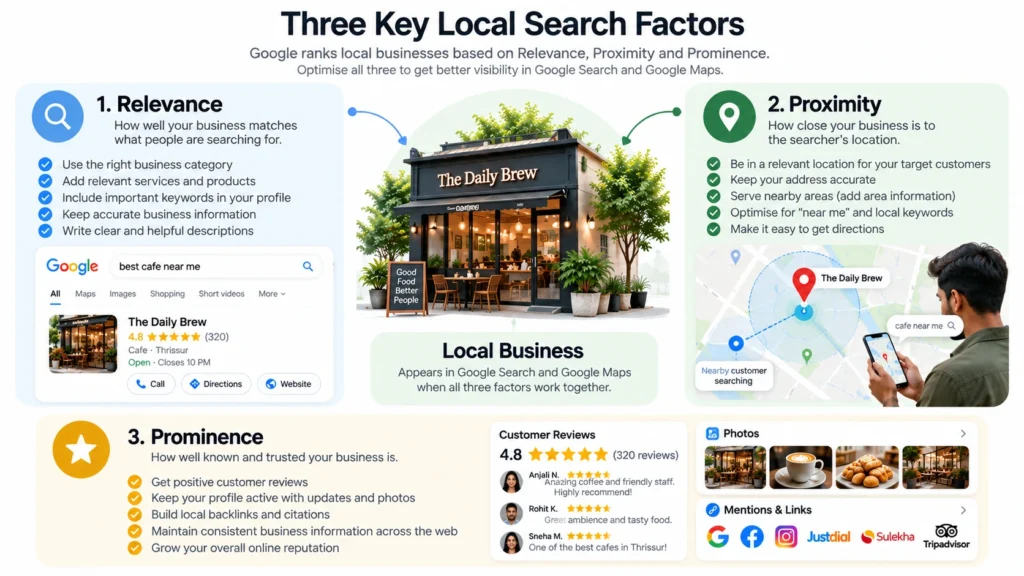
1. Proximity
Proximity is the physical distance between the searcher and the business.
This is one reason two people can search for the same service and see different local businesses.
A business close to one customer may not be equally close to another.
2. Relevance
Relevance is about how well your business matches what someone is searching for.
For example, if someone searches for:
“wedding photographer in Thrissur”
Google needs to understand which businesses actually provide wedding photography.
This is why your business category, services, website content, profile information, and other business details need to describe what you actually do.
3. Prominence
Prominence refers to how well-known a business appears to be.
Google states that prominence can be influenced by information such as links from websites and the number of reviews a business has.
This is why local SEO cannot be reduced to changing a few fields inside your GBP.
Your wider online presence matters.
Step 1: Create and Verify Your Google Business Profile
Before worrying about advanced optimisation, start with the basics.
Your business must be eligible for a Business Profile, and Google requires businesses to meet customers in person during their stated hours, with certain specific exceptions.
Once your profile is created, verification helps establish that you are authorised to represent the business. Google notes that verification makes the profile more likely to appear in search results.
Do not create multiple profiles for the same location simply because you want to target different keywords.
Google’s business representation guidelines require businesses to represent their real-world business accurately.
Step 2: Choose the Right Primary Business Category
Your primary category tells Google and customers what your business mainly does.
For example:
- Dentist
- Restaurant
- Electrician
- Digital marketing agency
- Real estate agency
- Clothing store
Google recommends selecting the category that most specifically represents your business. It also states that the categories you choose affect local ranking.
Do not choose a category simply because you think it has more searches.
Choose the category that accurately represents the business.
You can add relevant secondary categories where appropriate, but the primary category should represent the core business.
Step 3: Use Your Real Business Name
One of the common GBP mistakes is adding keywords to the business name.
For example, a real business might be called:
ABC Plumbing Services
But someone may try to change it to:
ABC Plumbing Services | Best Plumber in Thrissur
That is not how your business name should be represented.
Google says the business name should reflect the real-world name used consistently on your storefront, website, stationery, and by customers. Unnecessary information in the business name is not permitted and can lead to suspension.
Use the real business name.
Put services, locations, and other relevant information in the appropriate fields instead.
Step 4: Keep Your Business Information Accurate
Your profile should clearly tell customers:
- What you do
- Where you are
- When you are open
- How customers can contact you
- Which services you provide
- Where you serve customers
Google says complete and accurate business information can make a profile more likely to appear in relevant local searches.
Pay attention to:
Business name
Address
Phone number
Website
Opening hours
Special hours
Service area
Categories
Services
Small inconsistencies can also create confusion for customers.
Your business information should be consistent across your website, directories, social profiles, and other places where your business is mentioned.
Step 5: Set the Correct Service Area
Service-area businesses often make mistakes here.
Suppose you run a cleaning company and travel to customers instead of receiving customers at your office.
You do not need to pretend to have storefronts in every city you serve.
Google allows eligible service-area and hybrid businesses to define the areas they serve. Google currently allows up to 20 service areas based on cities, postal codes, or other areas, rather than a simple radius setting.
If customers do not visit your business address, Google says you should remove the address from the profile and use the service-area setup instead.
Use locations you genuinely serve.
Do not create fake locations simply to appear in more cities.
Step 6: Add Your Services
Your services give Google and potential customers more information about what you actually offer.
For example, a dental clinic could list:
- Teeth cleaning
- Dental implants
- Root canal treatment
- Dental consultation
A digital marketing business could list:
- SEO
- Local SEO
- Technical SEO
- Google Ads
- Social Media Marketing
- WordPress
Google says eligible service businesses can showcase services directly on their Business Profile, and these services may be highlighted when local customers search for an offering.
The important part is relevance.
Add services you genuinely provide.
Do not turn the services section into a keyword list.
Step 7: Add Real Business Photos
Photos help people understand what your business looks like before they contact or visit you.
Depending on your business, useful photos may include:
- Exterior
- Interior
- Staff
- Products
- Completed work
- Equipment
- Services
- Storefront
- Before and after work
Google recommends clear, well-lit images and provides specific photo guidelines for Business Profiles.
For a restaurant, real photos of the restaurant, food, seating area, and storefront can help customers understand what they are choosing.
For a construction company, completed projects and real work can communicate more than generic stock photos.
For a salon, actual interiors, services, and work examples can make the profile feel more useful.
Use real business media whenever possible.
Step 8: Build a Genuine Review Strategy
Reviews influence how customers evaluate a business.
They also form part of Google’s local search ecosystem. Google states that reviews can help a business stand out and provide useful information to potential customers.
The right approach is simple:
Ask real customers for genuine feedback.
You can send customers your Google review link or provide a QR code. Google supports both approaches.
Do not buy reviews.
Do not offer discounts in exchange for reviews.
Do not ask customers to leave only positive reviews.
Do not tell customers exactly what words they need to include.
Google’s policies prohibit incentivised reviews, selective review solicitation, and requests that manipulate the content or rating of reviews.
A better review strategy is to make it easy for genuine customers to share their experience.
And reply to reviews professionally, including negative ones.
Step 9: Optimise Your Website for Local Search
This is where many GBP strategies stop too early.
Your Google Business Profile and website should support each other.
Suppose you run a physiotherapy clinic in Thrissur.
Your website could have useful pages such as:
Physiotherapy Services
Sports Injury Treatment
Back Pain Treatment
Physiotherapy in Thrissur
The exact structure depends on the business.
The goal is not to create dozens of pages with locations added to every heading.
The goal is to create useful pages that match real customer searches.
Your website should clearly communicate:
- Business type
- Services
- Location
- Areas served
- Contact details
- Customer information
- Trust signals
- Relevant experience
This connects directly with the wider principles discussed in Why Does My Business Need SEO?.
Step 10: Build Location Pages Carefully
Location pages can help businesses serve multiple areas, but only when they provide genuine value.
For example, a service business working across Kerala may create useful pages around cities where it actually operates.
A good location page should contain information relevant to that location.
It should not simply replace the city name twenty times.
Useful local content might include:
- Services available in that area
- Types of customers served
- Local service information
- Areas covered
- Projects completed there
- Local customer questions
- Contact and service details
Avoid creating dozens of nearly identical pages that differ only by city name.
Step 11: Keep Local Citations and Business Details Consistent
A local citation is a mention of your business on another website.
This could include:
- Business directories
- Industry directories
- Local directories
- Chamber websites
- Professional organisations
- Local news websites
- Relevant business listings
The aim is not to submit your business to hundreds of random websites.
Focus on relevant and trustworthy places where your business genuinely belongs.
Keep basic information consistent:
Business name
Address
Phone
Website
Business category
This supports a clearer understanding of your business across the web.
Step 12: Use Local Business Structured Data
Your website can also help search engines understand your business through structured data.
Google’s LocalBusiness documentation explains that this markup can communicate details about a local business such as business hours, departments, and other information. Google recommends using the most specific LocalBusiness subtype that matches the business.
For example, the appropriate schema type may be more specific than simply using LocalBusiness.
A restaurant may use a restaurant-specific subtype.
A health club may use HealthClub.
The markup should match the real business and the information visible on the page.
Structured data does not guarantee a special search result, but it can help Google understand the information on your site. Google also recommends validating structured data and checking how Google sees the page
Step 13: Create Content Around Local Customer Questions
Local SEO is not only about commercial keywords.
Customers also search for information before choosing a business.
For example:
- how much does teeth cleaning cost in Thrissur
- how often should I service my AC
- what should I check before hiring a painter
- how long does a wedding photography package take
- what documents do I need for a tax consultant
- which areas does this cleaning company serve
These questions can become:
- Blog posts
- FAQs
- Service-page sections
- Location-page content
- GBP content
- Supporting website content
This is where informational search intent connects with commercial intent.
Someone may first search for an answer.
Later, they may search for a business.
Your website should be ready for both stages.
Step 14: Use Google Business Profile Posts
Google allows businesses to publish updates, offers, events, news, photos, and videos through Business Profile posts. These may appear in different sections of the profile across Search and Maps.
For a local business, useful post topics can include:
- New service
- New product
- Event
- Seasonal update
- Recent project
- Business announcement
- Useful customer information
Do not treat posts as a place to repeat the same keyword every few days.
Give people a reason to read them.
Step 15: Measure More Than Rankings
Local SEO performance should not be measured only by one keyword position.
Look at business actions such as:
- Calls
- Website visits
- Direction requests
- Messages
- Booking enquiries
- Contact form submissions
- Organic traffic
- Local search visibility
- Important keyword movement
- Review growth
- Leads from local pages
A local business does not need a pretty ranking report.
It needs to know whether search visibility is contributing to real business activity.
This is also why SEO should be measured against business outcomes, not rankings alone.
Common Google Business Profile Mistakes
Here are some problems I see repeatedly in local SEO:
Adding keywords to the business name
Use the real-world business name.
Creating fake locations
Do not create locations where your business does not actually operate.
Choosing unrelated categories
Choose categories that accurately describe your business.
Buying reviews
Google prohibits incentivised and manipulated reviews.
Using stock photos everywhere
Real business photos usually provide more useful information to potential customers.
Ignoring the website
GBP does not replace website SEO.
Creating thin location pages
Adding a city name to copied content does not create useful local content.
Building random citations
More listings are not automatically better. Relevance and accuracy matter.
Ignoring negative reviews
A professional response can give future customers more context.
Stopping after profile setup
Creating a profile is the beginning of local SEO, not the end.
Local SEO Checklist for Small Businesses
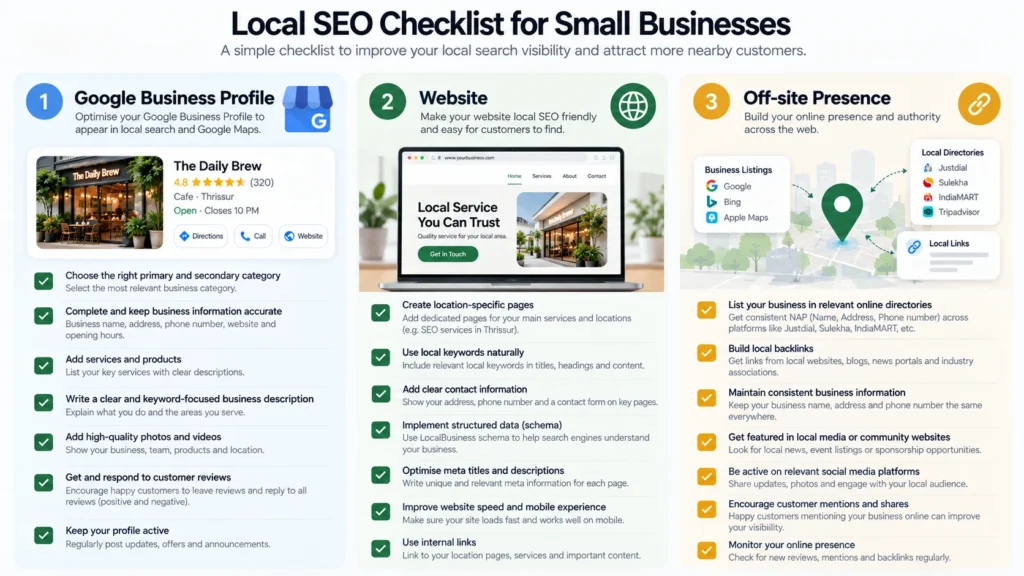
Before you finish your local SEO work, check:
Google Business Profile
- Business is eligible
- Profile is verified
- Real business name is used
- Correct primary category is selected
- Relevant secondary categories are added
- Address or service area is accurate
- Phone number is correct
- Website is correct
- Opening hours are updated
- Services are listed
- Business description is accurate
- Real photos are added
- Reviews are being requested legitimately
- Reviews are being answered
- Relevant posts are published
Website
- Business information is easy to find
- Location is clear
- Services have useful dedicated pages
- Local search intent is covered
- Contact information is accessible
- Internal links connect relevant pages
- Location pages provide unique value
- LocalBusiness structured data is appropriate
- Mobile experience works properly
Off-site presence
- Business information is consistent
- Relevant local citations exist
- Industry listings are accurate
- Relevant local links and mentions are being built
- Brand information is consistent across important platforms
How Long Does Local SEO Take?
There is no fixed number of days in which every local business will reach a particular position.
Local results depend on factors such as relevance, distance, prominence, competition, business type, location, website strength, profile quality, and the local search market. Google itself does not provide a guaranteed timeline or a way to pay for a better local ranking.
A new business competing in a crowded market may need more work than an established business with strong local signals.
That is why local SEO should be treated as ongoing work rather than a one-time profile setup.
Do Small Businesses Really Need Local SEO?
For a business that depends on local customers, local search can be a major part of customer discovery.
Think about a customer who needs an electrician today.
They may not know your company name.
They may simply search:
“electrician near me”
You cannot rely on brand awareness when the customer does not know you yet.
Local SEO gives your business a chance to be discovered during that search.
The same applies to restaurants, clinics, salons, gyms, repair companies, builders, consultants, training institutes, photographers, automobile businesses, and many other local businesses.
Local SEO Is More Than Google Maps
Google Maps is important, but local search does not stop there.
A customer may discover your business through:
Google Maps → Website → Reviews → Search results → Social profiles → Local directories → Brand mentions → Contact
Every part of that journey can affect how the customer evaluates your business.
Search itself has also changed over time. Google now combines traditional results, local results, richer search experiences, and AI-generated experiences in different ways.
You can read more about this shift in Evolution of SEO.
When Should You Hire a Local SEO Consultant?
You may need professional help when:
- Your business is not appearing for relevant local searches
- Your competitors are receiving local enquiries while you are not
- Your GBP has errors or visibility problems
- You do not know which categories to choose
- Your reviews are not being managed properly
- Your website does not target local search intent
- You serve several locations and need a proper structure
- Your profile has been suspended
- You want to track local SEO performance properly
- You want Google Search and Maps to work together with your website
Local SEO work should start with understanding the business, customers, services, locations, competition, and existing search visibility.
For businesses looking for SEO services in Kerala, Local SEO can be part of a wider SEO strategy rather than a standalone task.
Final Thoughts
Local SEO is not about adding a city name everywhere.
It is about helping Google understand your business and helping customers understand why your business is relevant to their search.
Your Google Business Profile is an important part of that system.
But the full picture includes:
GBP + Website + Reviews + Local Content + Citations + Business Information + Local Authority + Customer Experience
Start with the basics.
Use the correct business information.
Choose the right category.
Describe your services clearly.
Add real photos.
Ask genuine customers for reviews.
Build useful local pages.
Keep your business information consistent.
Track calls, enquiries, visits, and other meaningful actions.
Most importantly, make your business useful to the people searching for it.
A local customer does not care how many SEO tasks you completed.
They care whether they can find you, understand what you offer, trust your business, and contact you easily.
That is what local SEO should help achieve.
Need help with Local SEO?
If your business is not getting enough visibility on Google Search or Google Maps, you can contact a SEO Specialist for a local SEO review and see how SEO services in Kerala can fit your business.